RAW 8,
RAW 9 &
ProRAW.
What an iOS camera app can do with RAW through Apple’s Core Image framework, and what it cannot. An extensive comparison from the build of M-MODE: how close can a single RAW frame get to ProRAW in low light and in high contrast? What shipped, what failed, and why.
TL;DR
An iOS camera app does not get the frame buffer behind Apple’s photo pipeline. AVFoundation’s photo capture gives an app separate RAW captures, after the shutter press. To merge frames as ProRAW does, an app must capture and keep its own stream of raw frames. Android’s Camera2 API gives apps RAW bursts, and Google’s HDR+ merges them.[1][2][3] On iPhone, Adobe’s Project Indigo shows that it is possible: it captures raw frames while the viewfinder runs and merges up to 32 of them.[4]
RAW 9 is the new Core Image decoder in iOS 27. RAW 8 is from iOS 11 (2017), almost ten years older. At ISO 800, RAW 9 had 46–62% less luma grain and 68–96% less colour speckle. It costs development time, not shutter time: about 0.5s more to develop each photo, after the capture – the shutter does not need to wait.
But one frame is still no match for ProRAW in low light. In one test, ProRAW used about 5 times the exposure time of the single frame: ISO 400 at 1/121s against ISO 2000 at 1/638s. The file does not say if that is one frame or several. By the noise model in each DNG (NoiseProfile), ProRAW was about 2.9 stops cleaner.
Shadow blends, a neural denoiser and blends of separate captures failed, so they did not ship. For street photography, where the subject and the camera move, the tests below show one frame as the most suitable choice. Apple’s ProRes RAW video stream is an open question: in early low-light tests, one stream frame was 1.7 to 3.2 stops cleaner than one RAW photo frame, but softer.
What an iOS camera app gets
On iOS, a camera app reaches the camera through one API, AVFoundation, and Apple’s RAW developer is Core Image’s CIRAWFilter. That gives an app three ways to get a photo out of RAW:
| Path | What the app gets | Who does the work |
|---|---|---|
| Bayer DNG + RAW 8 | One sensor frame, mosaic data (binned on 48MP sensors) | The app, with Core Image’s decoder from iOS 11 (2017) |
| Bayer DNG + RAW 9 | The same frame | The app, with Core Image’s neural decoder from iOS 27 (2026) |
| ProRAW DNG | Usually a merge of several exposures (scene-dependent), already demosaiced and partly processed | Apple’s pipeline from iOS 14.3 (2020), before the app gets the file |
On iOS 27, every DNG in these tests (Bayer and ProRAW) offers RAW 9. Apple describes RAW 9 as a joint neural demosaic and denoise.[5] It runs as a Core ML model on the Neural Engine, where available.
How M-MODE sets up the decoder
The goal is single-frame, organic rendering: no sharpening, no local tone mapping, and highlights that roll off like film. So M-MODE turns off everything Apple adds, and develops the frame flat:
| CIRAWFilter setting | Value | Why |
|---|---|---|
| Decoder version | RAW 9, set first | Setting it resets every other setting |
| Exposure | −3 EV | CIRAWFilter caps its output at 1.0. The 3 stops are added back in linear light |
| Shadow bias | 0 | No lift of the blacks |
| Luminance noise reduction | 0.75 × the user’s amount | Lighter than Apple’s default |
| Tone curve, local tone map, contrast, detail, sharpness, moiré, despeckle | 0 | Nothing that Apple adds |
SWIFT CODE
// M-MODE.swift (BayerRecipe). Version helper inlined; comments shortened.
static let headroomEV = 3.0

static func configure(_ decoder: CIRAWFilter, noiseReduction: Double, colorNoiseReduction: Double? = nil) {
    // First: setting decoderVersion resets every other CIRAWFilter setting.
    if let version = decoder.supportedDecoderVersions.first(where: { $0.rawValue == "9.dng" }) {
        decoder.decoderVersion = version
    }
    let amount = Float(min(1, max(0, noiseReduction)))
    let colourAmount = Float(min(1, max(0, colorNoiseReduction ?? noiseReduction)))
    // Decode 3 EV dark: CIRAWFilter caps its output at 1.0.
    decoder.exposure = Float(-headroomEV)
    decoder.boostAmount = 0
    decoder.boostShadowAmount = 1
    decoder.shadowBias = 0
    if decoder.isLocalToneMapSupported { decoder.localToneMapAmount = 0 }
    if decoder.isContrastSupported { decoder.contrastAmount = 0 }
    if decoder.isDetailSupported { decoder.detailAmount = 0 }
    if decoder.isSharpnessSupported { decoder.sharpnessAmount = 0 }
    if decoder.isLuminanceNoiseReductionSupported { decoder.luminanceNoiseReductionAmount = amount * 0.75 }
    if decoder.isColorNoiseReductionSupported { decoder.colorNoiseReductionAmount = colourAmount }
    if decoder.isMoireReductionSupported { decoder.moireReductionAmount = 0 }
    if decoder.isDespeckleSupported { decoder.despeckleAmount = 0 }
    // White balance, baseline exposure and lens correction stay as captured.
}

// After decoding: add the 3 EV back in extended linear space, before the shoulder curve.
static func restoreHeadroom(_ image: CIImage) -> CIImage {
    image.applyingFilter("CIExposureAdjust", parameters: [kCIInputEVKey: headroomEV])
}
Bright skies 2 to 3 stops over white came out flat, although the Bayer data still held them. That is why M-MODE decodes 3 stops dark. After M-MODE adds the 3 stops back, a shoulder curve, x / (0.82 + x), compresses all values above white. Mid-grey stays at 0.18. Highlights roll off and do not clip hard.
RAW 8 vs RAW 9
The same DNGs, decoded with both decoders and the same settings, with no LUT: the 2026 decoder against the 2017 one. RAW 9 was cleaner at every ISO tested, and the gap grows with ISO.
| Shot | ISO | Luma grain | Colour speckle | At 100% |
|---|---|---|---|---|
| Test shot 1 · indoor, bright | 54 | −14% | tiny in both | practically the same |
| Test shot 2 · indoor, bright | 54 | −20% | tiny in both | practically the same |
| Test shot 3 · indoor, dim | 125 | −32% | tiny in both | RAW 9 visibly cleaner, no detail lost |
| Test shot 4 · indoor, low light | 800 | −55% | −92% | RAW 9 far cleaner |
| Test shot 5 · indoor, low light | 800 | −62% | −96% | RAW 8: heavy purple and green speckle |
| Test shot 6 · indoor, low light | 800 | −46% | −68% | RAW 9 far cleaner |
Colour stayed within 0.1 to 3 levels (of 255) in every pair.
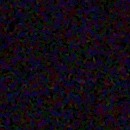
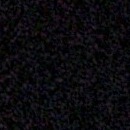
Dark background, white surface
One capture. RAW 8 keeps coloured speckle in the dark area; RAW 9 gives a darker background and a cleaner white.
130px and 60px crops, enlarged.


Shadow blends
A common technique: decode one frame twice and mix the results by brightness. The aim is to use the better decoder for each tone, here to remove noise in near-black areas.
At ISO 3200 and 6400, RAW 9 showed coarse dark blotches in near-black areas. A test of one setting at a time found the cause. RAW 9’s output goes below zero in near-black areas, and the decoder clips the negative values. M-MODE’s shadow bias of 0 shows it. Apple’s default of 5 hides it, but it also crushes the shadows and turns the frame yellow.
The next test was a blend of two decodes of the same DNG: RAW 8 below 0.004 linear, RAW 9 above 0.02, with a smooth mask between. The blotches went away. But RAW 9 lets a near-black wall fall to a clean, deep black, and every blend filled it with coloured speckle again. The blend also needs a second decode, so plain RAW 9 stayed.
An ISO split did not help either. RAW 8 below ISO 400 saved about 0.4s per photo, but at ISO 125, RAW 9 was already 32% cleaner.
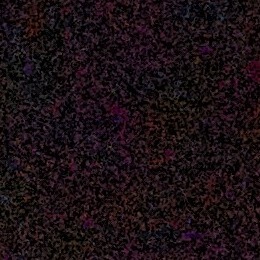
Near-black wall
Every blend brings RAW 8’s coloured speckle back into the shadows.
260px crops, enlarged. Blends from 0.004–0.02, 0.01–0.04 and 0.02–0.08 linear.
NAFNet
A survey of the open models found one candidate: NAFNet (MIT licence, trained on smartphone noise), the only fast model that a paid app can ship. Restormer costs about 9 times as much. LED is CC BY-NC, and CANS and the NTIRE 2026 entries have no licence for commercial use.[6]
| Where | Time | Result |
|---|---|---|
| iPhone, Core ML, Neural Engine | 10–11s | Corrupted green and magenta tiles on a real shot |
| Mac, Core ML | About 5.5s | Clean |
| M4 Mac, PyTorch with MPS | 90–117s | Small gain; most ISO 6400 noise and RAW 9’s blotches stay |
RAW 9 alone was cleaner than RAW 8 plus NAFNet in the midtones. A camera cannot wait 10s for each photo. On iOS, the one neural model that fits in about a second is Apple’s own, inside the decoder.
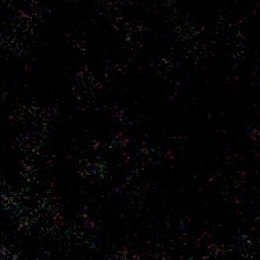
Plain wall
RAW 8 and RAW 9, with and without NAFNet.
300px crops, enlarged.
Blending separate captures
Why a merge like ProRAW is hard for an iOS app
Apple does not document its pipeline in detail. This summary comes from its public descriptions and the published HDR+ research, plus what the files show.[7][1]
Apple’s pipeline works from the sensor’s continuous stream, so it can use frames from around the shutter press. Apple says that ProRAW combines several exposures when the scene needs it. HDR+, the published method closest to it, aligns frames in small tiles and merges them on the raw sensor data.
AVFoundation’s photo capture gives an app no pre-shutter buffer. It delivers Bayer RAW as photos that the app requests after the press. In a bracket, they are 0.1 to 0.25s apart. A Bayer frame and a ProRAW are 0.3 to 0.5s apart. In that time, a person who walks moves about 14 to 70cm. Android is different: its Camera2 API lets an app capture a burst of RAW frames and merge them itself, as Google’s HDR+ and third-party apps such as MotionCam and PhotonCamera do.[1][2][3][8][9]
On quad-pixel 48MP cameras, the camera bins that Bayer RAW. Apple says full sensor resolution is available as ProRAW, and it documents no 48MP Bayer route.[10]
With 2 or 3 separate frames, there is no majority. Where the frames disagree, the merge must guess: “it moved” or “it is a highlight or noise”. A wrong guess is a ghost. The app must also decode each frame to a full RGB image on the GPU before it can align it, while the user takes the next photo. M-MODE tested two such blends.
A ProRAW companion frame
Each press also took one ProRAW frame, blended into the Bayer development below the highlights. Apple corrects the geometry of the ProRAW, so it was 16px and 0.1% of scale away from the Bayer decode. Vision’s translational registration returned nothing in dark scenes; its homography registration worked after M-MODE normalised the brightness of its small copies.
| Image | Flat-area noise |
|---|---|
| Bayer frame alone | 0.0127 |
| Blended | 0.0024 |
| ProRAW alone | 0.0013 |
The blend took 1.8s on the phone. But the two exposures were 0.3 to 0.5s apart. A handheld frame that was a little soft, blended with a sharp ProRAW, showed every edge twice. Each press also cost 1.4 to 1.6s for Apple’s merge and 30MB. If the ProRAW is the photo whenever it matters, take the ProRAW.
A second frame 4 stops darker
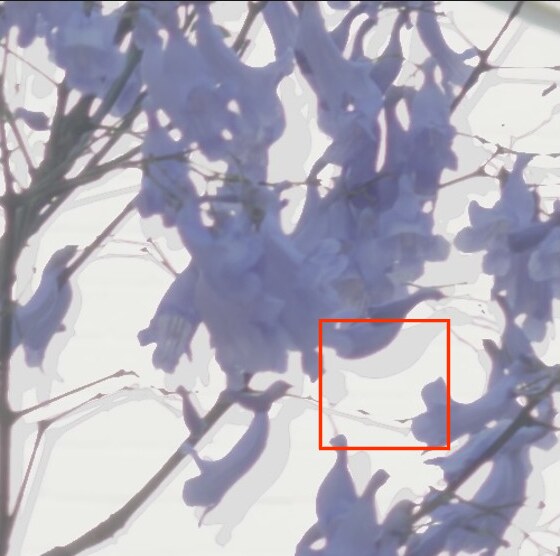
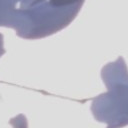
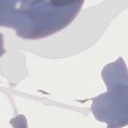
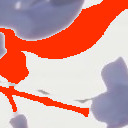
For dynamic range, the app took a base frame plus one frame 4 stops darker. In a +1.7 EV test, 65% of the frame clipped, and the merge recovered 2 to 4 stops of highlights. Then it met jacaranda flowers in a breeze. The merge reads “the darker frame is brighter here” as “the base frame clipped”, so where a flower moved, it painted sky into the flower.
Gates followed: skip a pair below 95% agreement, a start gap over 0.1s, phone movement, or a shift over 0.5% of the width. Agreement was 87.8% on the pair that ghosted and 92.3% on a still scene. At a 95% gate, every outdoor pair of the day developed as a single frame, and the one pair that passed still ghosted at 100%.
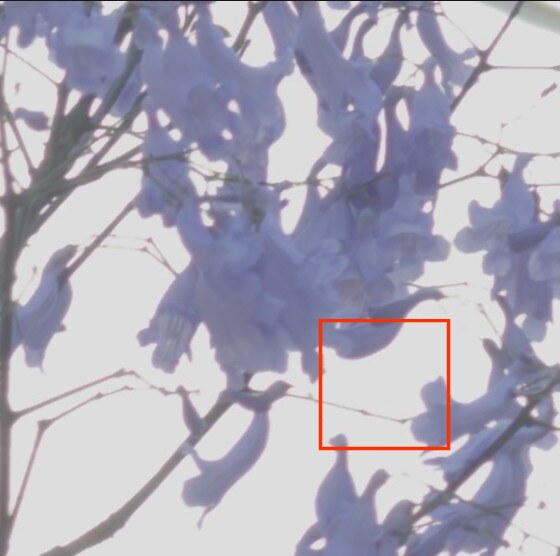
Moving subject
Jacaranda flowers in a breeze. The blend keeps a pale grey copy of the subject where it stood in the other frame. The right panel marks the ghost in orange.
Top: the single frame and the blend, 560px; the orange box marks the crops. Below: 128px crops, enlarged. Orange: pixels where the base frame shows sky but the merge did not recover it.
The ProRes RAW stream
Officially, AVFoundation’s photo capture is how an app gets RAW stills. A second path is ProRes RAW video through AVCaptureVideoDataOutput. On an iPhone 17 Pro Max it gives 12-bit packed Bayer frames of 4224×3024 (12MP, binned), 16.7ms apart at 60fps. Apple does not document their layout, and Core Image has no decoder for them. A developer on Apple’s forums, lordetrovador, had reported how to unpack them.[11][12]
One app shows where this path can go. Adobe’s Project Indigo, from a research team that includes the authors of HDR+, says that it is “constantly capturing raw images while the viewfinder is running”. It merges up to 32 frames, uses the last frame before the press as its reference, and rejects movement in the merge.[4] Adobe does not say which capture API it uses. M-MODE’s tests below are a first look at the same idea, not a match for that work.
M-MODE saved the stream frames on the iPhone. A Mac, not yet the app, unpacked the 12-bit data, merged the frames with tile alignment and movement rejection, and wrote the result as a DNG. Core Image accepts that DNG and offers RAW 9 for it. Three limits showed at once. The image signal processor already applies temporal noise reduction and white balance to each frame. In the stream format, the photo output offers no RAW, so an app cannot take a RAW photo and record the stream in one camera configuration. And all frames have one exposure, so a merge cannot recover a highlight that is clipped.
The largest gain was not the merge. In low light, one stream frame alone was 1.7 to 3.2 stops cleaner than one RAW photo frame by the noise measure, and the merge added 0.3 to 0.6 stops. Where the subject moved, only one frame counted. The stream picture is softer, and the measure counts smooth areas as good.
Three ways to merge frames, side by side
| Separate DNG blend | ProRes RAW stream | ProRAW | |
|---|---|---|---|
| Who merges | The app, after the capture | The app, from Apple’s video stream | Apple, inside the image signal processor |
| Frames | 2 or 3 | 10 (5 to 6 used after movement rejection) | Not documented; about 5 times the exposure time in one test |
| Time between frames | 0.1 to 0.5s | 16.7ms (60fps) | Not documented |
| Frames before the press | No | Not in these tests | Yes, from the sensor stream |
| Exposure | Different for each frame | Equal, set by the app; recorded 0.4 to 1.2 EV darker than a photo at the same setting | Several, chosen by the scene; it can ignore the shutter speed that is set |
| Data | Full RAW photos, one DNG each | 12-bit Bayer, binned, with temporal noise reduction and white balance applied | Demosaiced and partly processed |
| Resolution | 12MP (binned on 48MP sensors) | 12MP (4224×3024) | Up to 48MP |
| Highlights over one frame | 2 to 4 stops (with a frame 4 stops darker) | +0.4 stops, from the darker recording, not from the merge (one run) | +2.5 stops (one run) |
| Shadows lifted 2 to 3 EV | Not measured | +0.56 stops for one frame, +0.81 merged; softer | +0.05 stops by this measure; the most fine detail |
| Low light, ISO 3200 to 6400 | Not measured | +1.7 to +3.2 stops for one frame, +2.0 to +3.9 merged | +2.1 to +3.9 stops, with 10 to 27 times the set exposure time |
| Ghosts on moving subjects | Yes | Reduced, not removed fully | None seen in these tests |
| Status | Failed: ghosts on moving subjects; did not ship | Under evaluation | Available in M-MODE, suggested in low light |
Highlights: the clip level above one RAW photo frame, at equal mid-tones. Shadows and low light: signal over noise in flat dark areas, against one RAW photo frame. This measure counts smooth areas as good, so it does not show the detail that ProRAW keeps. Five hand-held runs on one iPhone 17 Pro Max: two in bright light, three in low light, where ProRAW chose 1/60s to 1/121s against a set shutter of 1/1259s and 1/1600s. More tests are necessary.
The cost
of RAW 9
| Test | RAW 8 | RAW 9 |
|---|---|---|
| Develop, median | 0.58s · ISO 100–200 | 1.10s · ISO 400–1000 |
| Shutter press to photo | 1.71s | 2.13s |
| Burst develop, median | 0.67s · ISO 160 | 1.20s · ISO 640 |
The shutter does not wait for development. A capture takes about 0.05s, and the app develops the photo after it, while the user takes the next photo.
The first RAW 9 build was slow: 5.5s per photo, and the last photo of a burst waited 69s. RAW 9 did not cause that. The app’s scheduler did, and three corrections to it gave the times above.
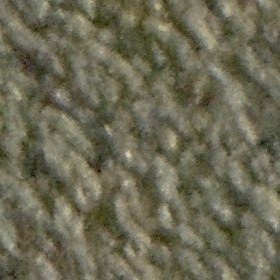
Carpet: ProRAW against one frame
The same dark scene, pushed 4 stops. ProRAW keeps the weave of the carpet. The single frame is colour noise, with or without noise reduction.
280px crops at 100%, enlarged. Two captures of the same scene, 30s apart, with the same look. An earlier build decoded the single frame, before RAW 9; RAW 9 removes much of the colour speckle, but not the gap to ProRAW.
What shipped
| Single Bayer frame | ProRAW | |
|---|---|---|
| ISO 2000, 1/638s, same scene | One frame, DNG NoiseProfile 1.7e-3 | NoiseProfile 3e-5, reported as ISO 400 at 1/121s: about 5 times the exposure time |
| Shutter press to frame | 0.05s (0.27s for a 3-frame bracket) | 1.4–1.6s |
| Colour shading at the telephoto's sides | Not corrected, 1.5× red and blue over green | Corrected |
| Highlights at +1.7 EV | Clips 1.4 stops over white | Holds the sky and the flowers |
- RAW 9 for every Bayer shot. One frame, no blend: 1.0 to 1.6s to develop, about 2.1s from the shutter to the finished photo.
- No merged frames, no night mode, no companion frames, no extra denoiser.
- The conclusion for M-MODE: a merge helps the parts of a scene that stay still, and the parts that move keep one frame. M-MODE is for street photography and moments that do not repeat, where the subject and the camera move. So one frame stays. The ProRes RAW stream is future work.
- For low light, the app suggests ProRAW once per launch. It shows the hint at a brightness value of −1 or lower, or at ISO 1600 or more, auto or manual.
The merge that makes ProRAW clean occurs inside Apple’s pipeline, before any app gets the file. An iOS camera app has three honest choices: take Apple’s merged file, develop one frame well, or capture its own stream of frames and merge them, as Project Indigo does. Technically, ProRAW is the benchmark on iPhone, and RAW 9 gets the most out of one frame. Artistically, the choice is open: one frame keeps one moment as it happened, with its grain and its motion. M-MODE offers the first two, and develops the single frame its own way: one exposure, no sharpening, no local tone mapping, and a highlight roll-off you choose.
M-MODE ON THE APP STORE ↗References
- [1]
Hasinoff et al., “Burst photography for high dynamic range and low-light imaging on mobile cameras” (HDR+), SIGGRAPH Asia 2016
Google’s HDR+ aligns and merges a burst of Bayer RAW frames; the paper says the pipeline is built on Android’s Camera2 API.
research.google/pubs/pub45586 ↗ - [2]
MotionCam, a third-party Android camera app
Replaces the camera pipeline and merges RAW frames to reduce noise. Its original source is no longer public; this is a fork on GitHub.
github.com/f0enix/motioncam ↗ - [3]
PhotonCamera, an open-source Android camera app (GPL-3.0)
Its HDRX mode stacks several low-exposure RAW frames.
github.com/eszdman/PhotonCamera ↗ - [4]
Levoy and Kainz, “Project Indigo – a computational photography camera app”, Adobe Research, June 2025
An iPhone camera app from Adobe that captures raw frames while the viewfinder runs and merges up to 32 of them, with zero shutter lag in its Photo mode. The article does not say which capture API it uses.
research.adobe.com/articles/indigo/indigo.html ↗ - [5]
Apple, WWDC26 session 305: “Enhance RAW image processing with Core Image”
RAW 9 as a joint neural demosaic and denoise.
developer.apple.com/videos/play/wwdc2026/305 ↗ - [6]
Chen et al., NAFNet (megvii-research), MIT licence
The denoiser tested in section 03.
github.com/megvii-research/NAFNet ↗ - [7]
Apple, WWDC21 session 10160: “Capture and process ProRAW images”
Apple’s description of ProRAW as a merge of several demosaiced exposures.
developer.apple.com/videos/play/wwdc2021/10160 ↗ - [8]
hdr-plus: an open-source C++ and Halide implementation of the HDR+ align and merge
Shows that the merge itself is public knowledge.
github.com/timothybrooks/hdr-plus ↗ - [9]
Monod, Delon and Veit, “An analysis and implementation of the HDR+ burst denoising method”, IPOL 2021
A peer-reviewed analysis with a Python implementation (hdrplus-python).
ipol.im/pub/art/2021/336 ↗ - [10]
Apple Developer Forums, “Radiometric interpretation of Apple ProRAW and Bayer RAW access via AVFoundation”, DTS Engineer replies, 2026
Bayer RAW capture and brackets through AVFoundation; on quad-pixel 48MP cameras Bayer RAW is binned, and full sensor resolution is available as ProRAW.
developer.apple.com/forums/thread/825883 ↗ - [11]
Apple Developer Forums, “Configuring capture pipeline with ProResRAW codec”, DTS Engineer replies, 2026
ProRes RAW frames through AVCaptureVideoDataOutput, as kCVPixelFormatType_96VersatileBayerPacked12 buffers.
developer.apple.com/forums/thread/814335 ↗ - [12]
Apple Developer Forums, “Working with kCVPixelFormatType_96VersatileBayerPacked12”, reply by lordetrovador
Post by lordetrovador, 2026: unpacked these 12-bit buffers with Metal (4224×3024, iPhone 17 Pro Max). One developer’s report, not confirmed by Apple; Apple does not document the layout.
developer.apple.com/forums/thread/824895 ↗
All measurements come from tests on one iPhone 17 Pro Max with iOS 27. The data comes from capture logs and decoded test shots, not from a lab.